Customer and vehicle history, always at hand
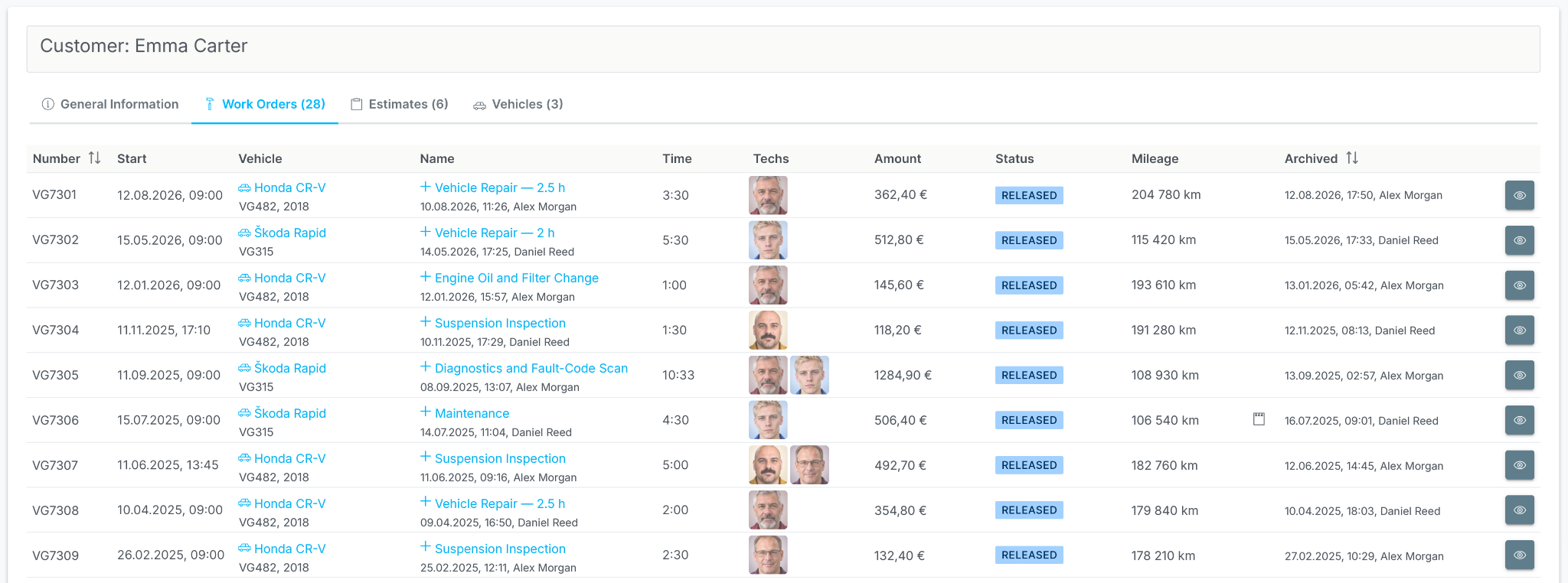
When a customer returns, there's no need to search for old paperwork. Their customer and vehicle history is all in one place.
From the first customer enquiry to a completed, paid work order. Manage the entire workflow in one system, with a clear history, statistics and control at every stage.
For workshops of every size, from a one-person business to a network of repair shops.
Proven in daily workshop use for over 10 years.
14-day free trial
VirtualGarage brings customer enquiries, work orders, scheduling, parts, payments and team performance together in one system.
Labour, services, parts, documents, payments and change history in a single work order.
Plan work bays, technicians, working hours and workshop capacity for each day.
Customer and vehicle history, including work orders, estimates and fitted parts.
Stock levels, reservations, customer-specific parts orders, purchases and supplier returns.
Sales invoices, prepayments, supplier invoices, cash transactions, card payments and bank transfers.
Roles, permissions, employee sales, technician work and workload, earnings, warranty work, returns and profit.
Manage the entire process, from the customer enquiry and estimate to the work order, parts purchases, sales invoice and payment. No unnecessary steps or repeated data entry, with a history at every stage.
As work progresses, the system highlights what needs attention. Unfinished tasks stay visible to the team instead of getting lost in the day-to-day workload.
For businesses that need to manage customers, vehicles, appointments, work, materials, invoices and service history.
See which work orders are in progress, which parts are needed, what has been paid and where your workshop earns its profit. Work from the office, the workshop or remotely, using any internet-connected device.
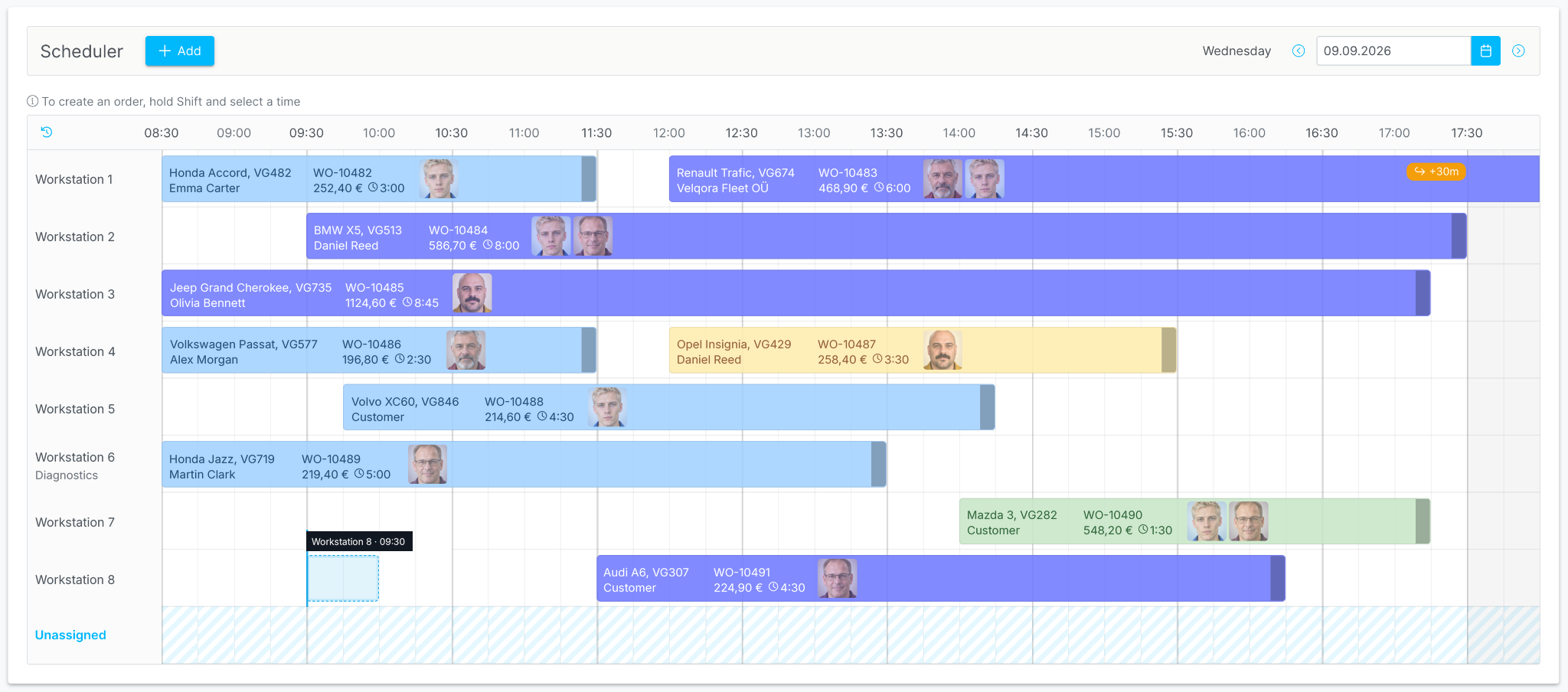
See planned work orders, which technicians are busy, where each vehicle is being worked on and where time is available.
Reservations, customer-specific parts orders, purchases and returns stay linked to the work order, rather than being managed separately.
Payments, invoices, profit, discounts, warranty work and returns are visible as you work, not just in separate reports.
The system records important staff actions, including changes to statuses, line items, payments, returns, comments and other work order details.
Manage multiple companies and locations under one VirtualGarage account. Each location has its own work orders, employees, cashboxes and settings, while employee roles determine which sections and actions are available.
Manage separate legal entities and workshop locations in one account, whether your business is growing or already operates a network of repair shops.
An employee can work at multiple locations without duplicate records. All their information stays in one place.
Assign one or more roles to an employee at each location. They see only the sections and actions available to those roles.
Built for the workshop's daily routine. Perform key actions where you're already working, without unnecessary navigation, repeated data entry or manual page refreshes.
Choose labour, parts and suppliers as you add a work order line. Selling prices can be calculated automatically using your markup rules.
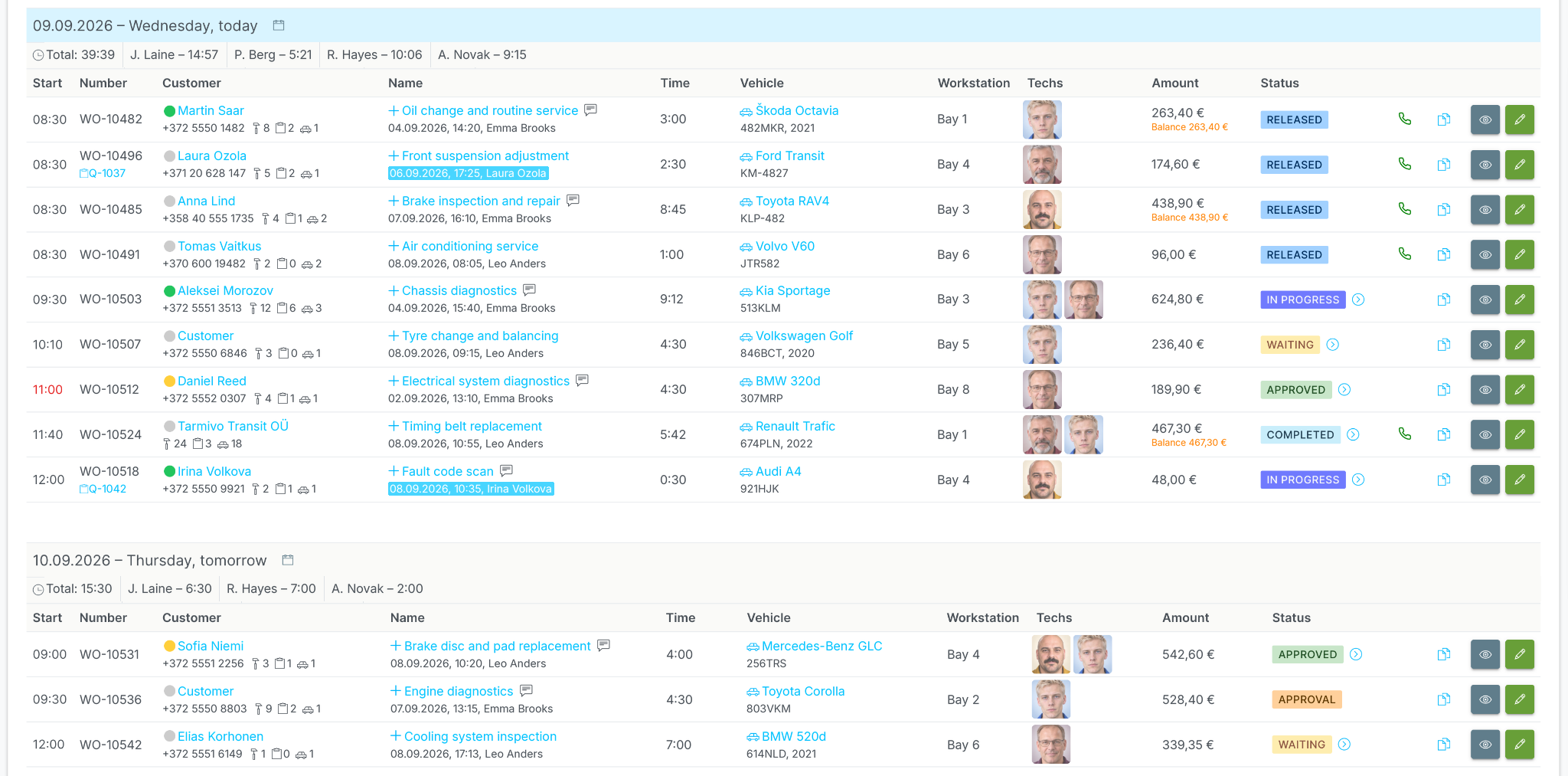
Active work orders are grouped by day and time. Each row shows the status, technician, work bay, total and key order details at a glance.
Open a work order over the list, make your changes and save. You're straight back to the day you were working on.
Create templates of common jobs with services and parts, then add the whole set to a work order or estimate with one click.
Copy a work order or create an estimate from it in a couple of clicks, without entering the same information again.
Work orders and estimates update for employees in real time, without anyone having to refresh the page.
Try VirtualGarage for free and see how work orders, scheduling, parts and your team come together in one workflow.
Proven in daily workshop use for over 10 years.
Over 50 000 work orders and estimates created.
Over €6 000 000 in turnover processed through the system.
14-day free trial
Repairs don't always fit neatly into a calendar. Active work orders give you a clear day-by-day overview, while the scheduler helps you allocate time, work bays and technicians within each day.
See which work bay a job is assigned to, which technicians are responsible and how much time is planned.
If a work order started on a previous working day or continues into the next, it stays visible in the schedule for each relevant day.
Quickly view work order details, change a status or open an order for editing directly from the scheduler.
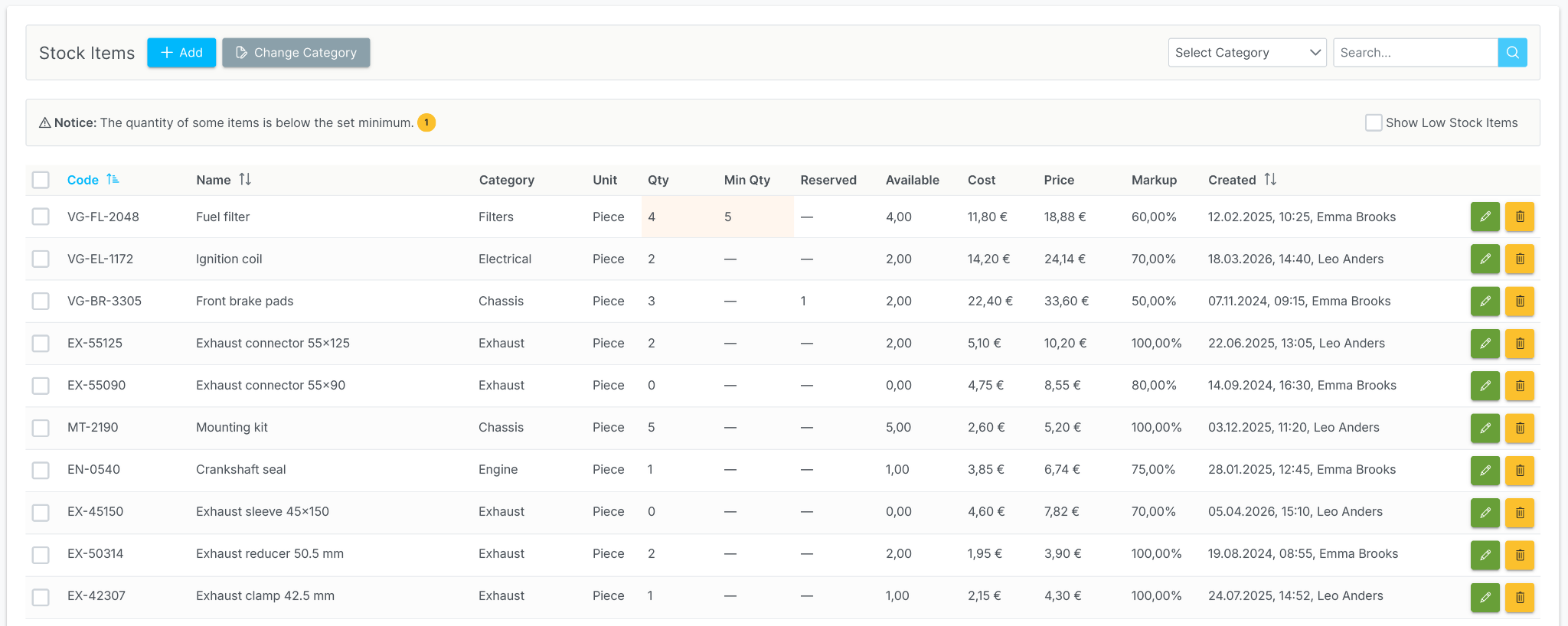
See what is actually in stock, what is already reserved for work orders and which parts need reordering.
See the physical stock quantity, the amount reserved for work orders and the quantity still available.
When a part's stock level drops below the minimum you set, it's easy to find in the list and reorder.
Parts are received into stock from the supplier invoice. Parts used on a work order are automatically deducted when the order is completed.
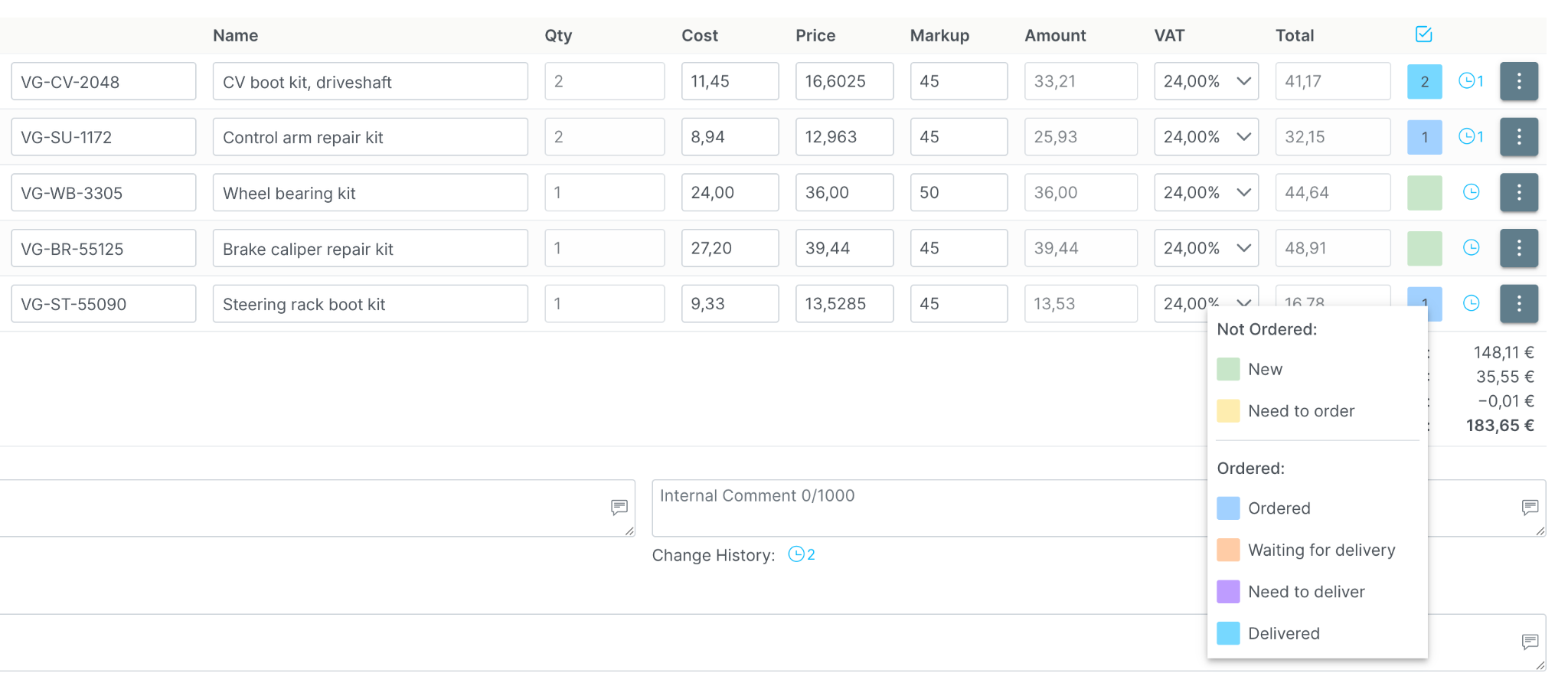
Not every part needs to go into stock. Add it directly to a specific customer's work order, complete with its status, supplier, purchase price, change history and return tracking.
Parts ordered for customers are kept separate from regular stock, so they don't get mixed up with parts physically held in your warehouse.
For each ordered part, see the current delivery status, returned quantity, reason for return and change history.
If a part doesn't fit, return it to the supplier or move it into regular stock, keeping the reason, quantity and history.
In VirtualGarage, a supplier invoice is more than a document to file or pay. A purchase isn't considered checked until its invoice is entered into the system.
When entering an invoice, you can see exactly what was bought, for which work order, at what price and in what quantity. Extra items, quantity or purchase price errors and unresolved returns become visible before payment.
A stock part increases the stock balance, a consumable appears in the statistics, and a customer-specific part stays linked to its work order.
Once the invoice is entered, the supplier, purchase price and ordered quantity are recorded for the customer-specific part. Open the linked supplier invoice directly from the work order.
An incorrect quantity, an extra item or an unresolved return becomes apparent when entering the invoice: each line must be linked to an actual transaction.
Unpaid supplier invoices are collected in one list. Check the amounts, payment details and document numbers, then mark them as paid in a single action.
Work orders, documents and payments are linked, so you can see what customers have paid, which supplier invoices are still open and where your workshop earns its profit. Closing an accounting period protects documents from retrospective changes.
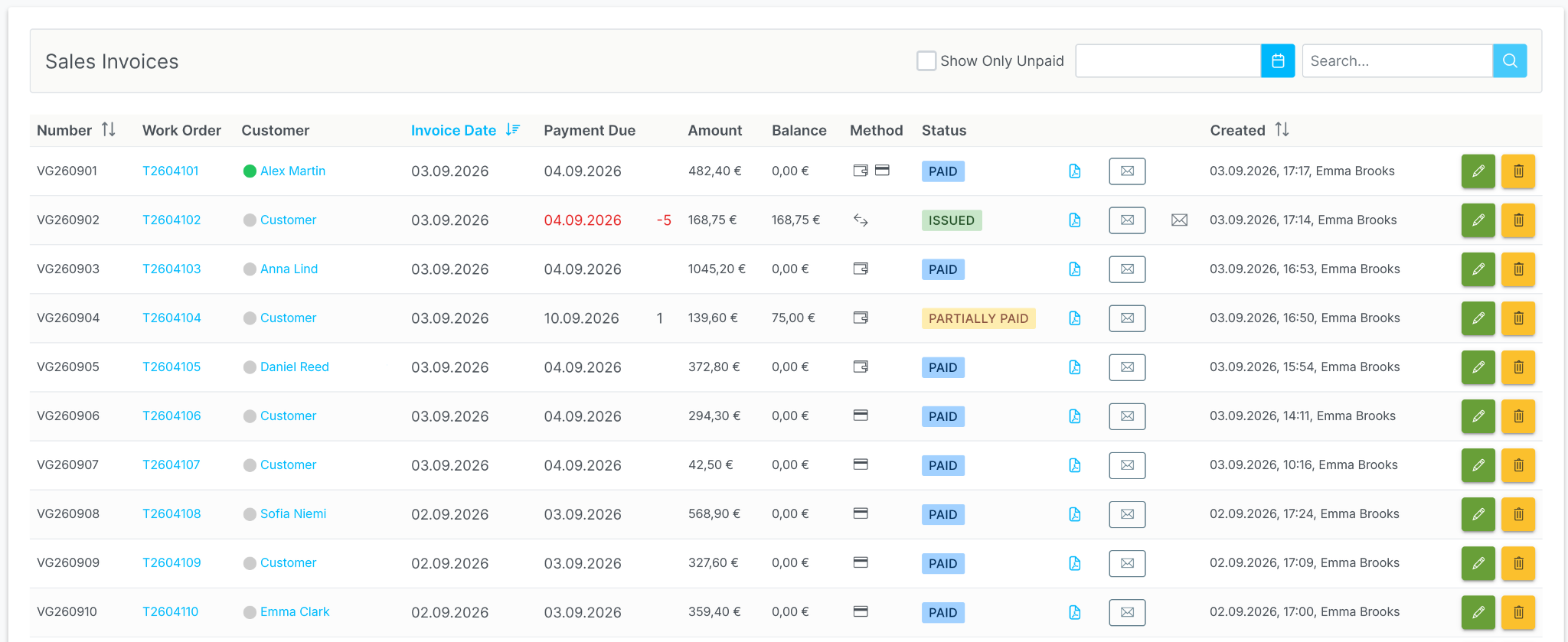
Create customer invoices and prepayment invoices from the work order without entering data again. Download them as PDFs or email them to the customer.
Work orders and documents show what is fully or partly paid, the outstanding amount and whether an invoice is overdue.
Settle one invoice with several payments and different methods: cash, card or bank transfer. Every payment stays in the history.
Purchase price, selling price, discount, markup, margin and profit reveal the actual result.
Close the accounting period to protect documents from accidental changes after your reports have been submitted.
When consumables are enabled for a service, VirtualGarage adds them to the work order or estimate automatically as a separate line.
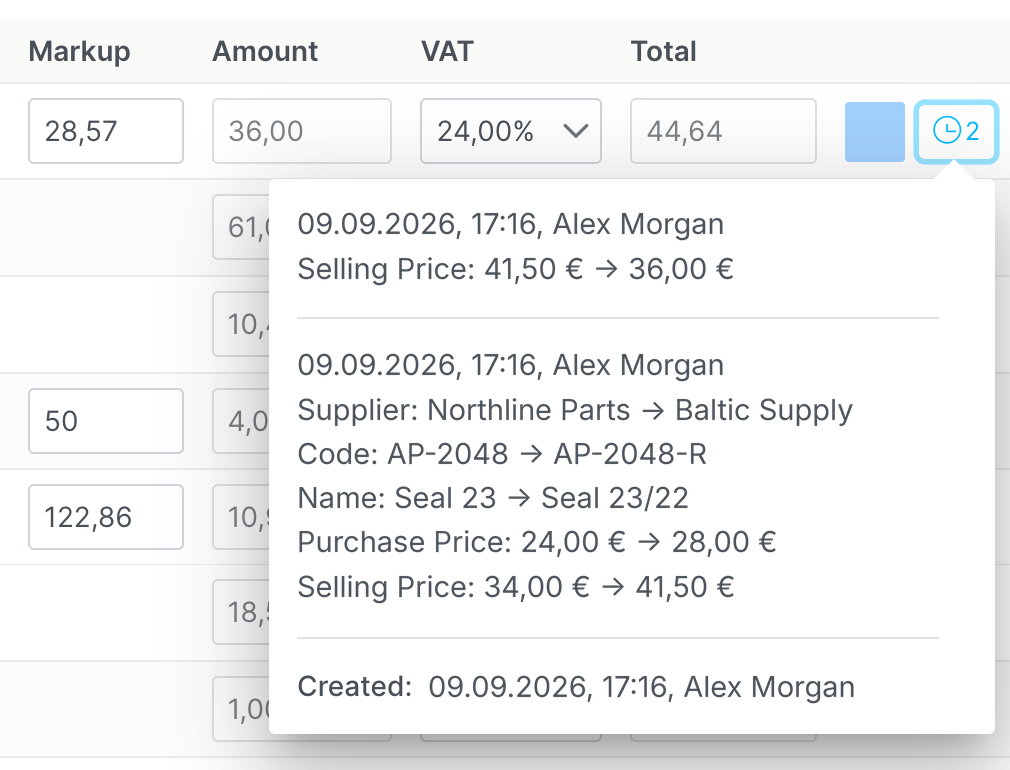
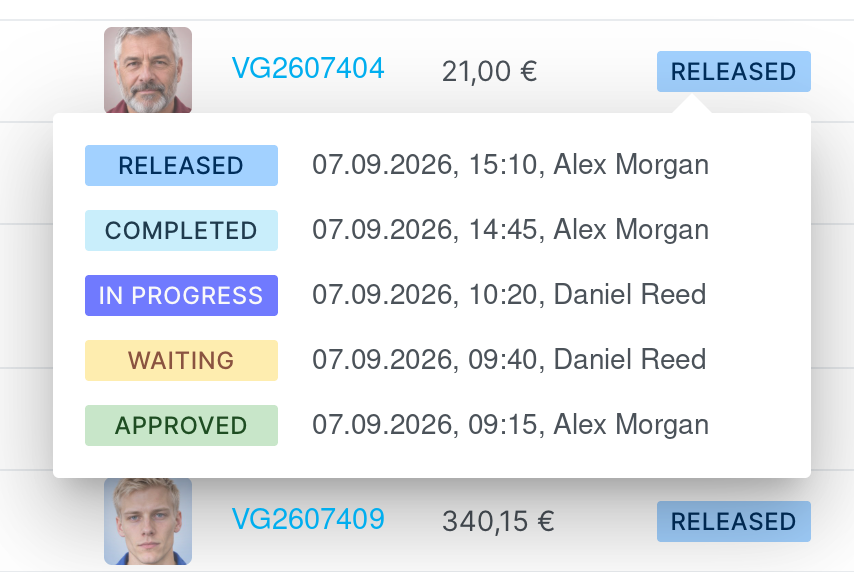
Work orders and estimates retain the history of statuses, line items, comments, recommendations and deleted lines. See who changed important information and when.
Changes to the price, quantity, discount, supplier and other important details are recorded for each line.
See who edited comments, recommendations and internal notes in work orders and estimates, and when.
Show deleted lines, review them and restore them when needed.
When a customer returns, there's no need to search for old paperwork. Their customer and vehicle history is all in one place.
Help customers remember their appointments and remind them when their vehicle's next service is due.
Send the customer a reminder before their scheduled visit.
After completing a job, create a reminder for the next service based on a time interval, mileage or a specific date.
Reminders help customers remember their appointments and keep your workshop's schedule on track.
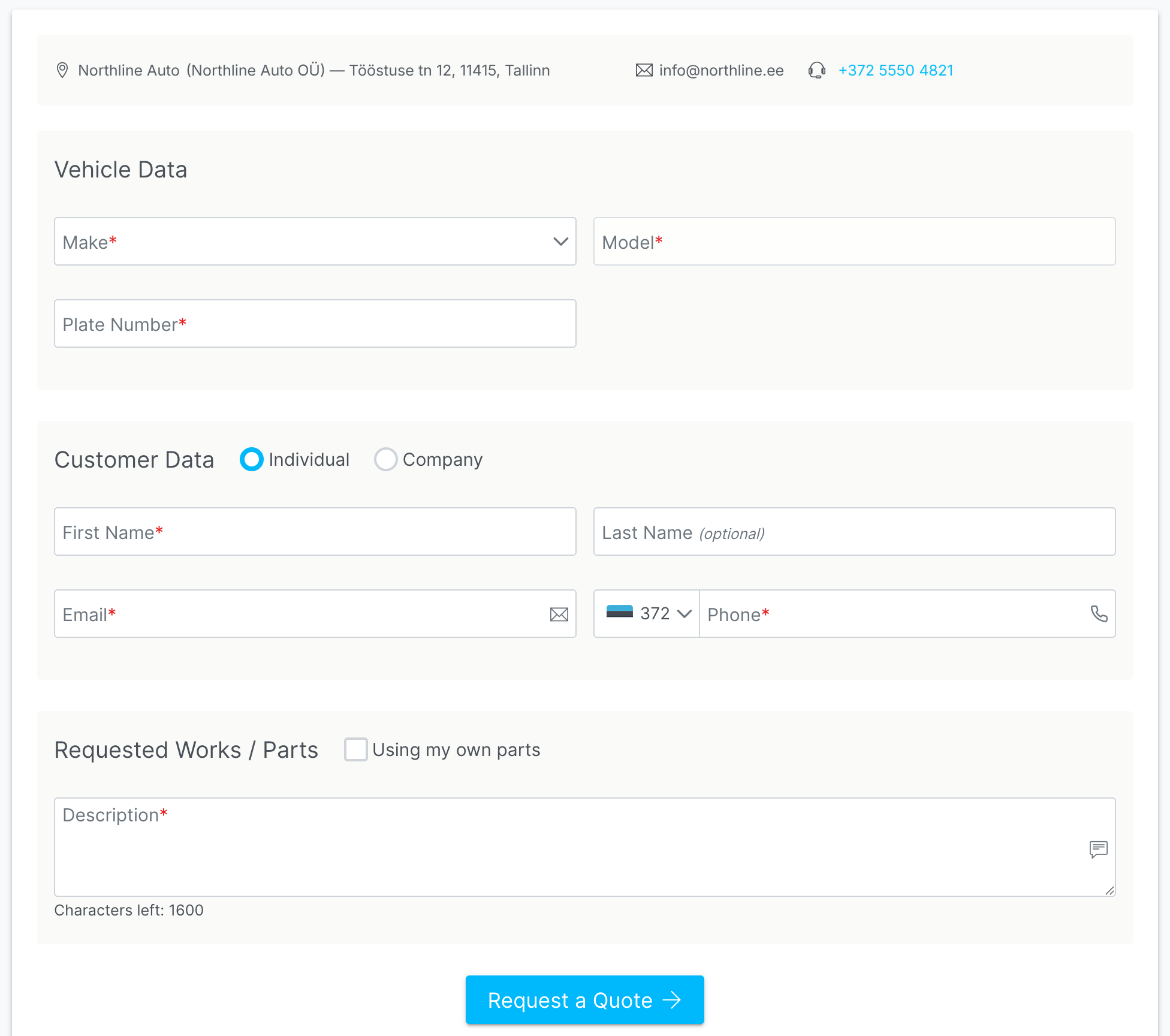
VirtualGarage helps you receive enquiries from your website, prepare estimates, track views and let customers choose an appointment time online.
Your workshop gets a link to a price request form for its website. Enquiries go straight into the system, without scattered messenger conversations or lost messages.
Prepare an estimate from the customer's enquiry, send it with a PDF and an online link, track whether it has been viewed and turn it into a work order when needed.
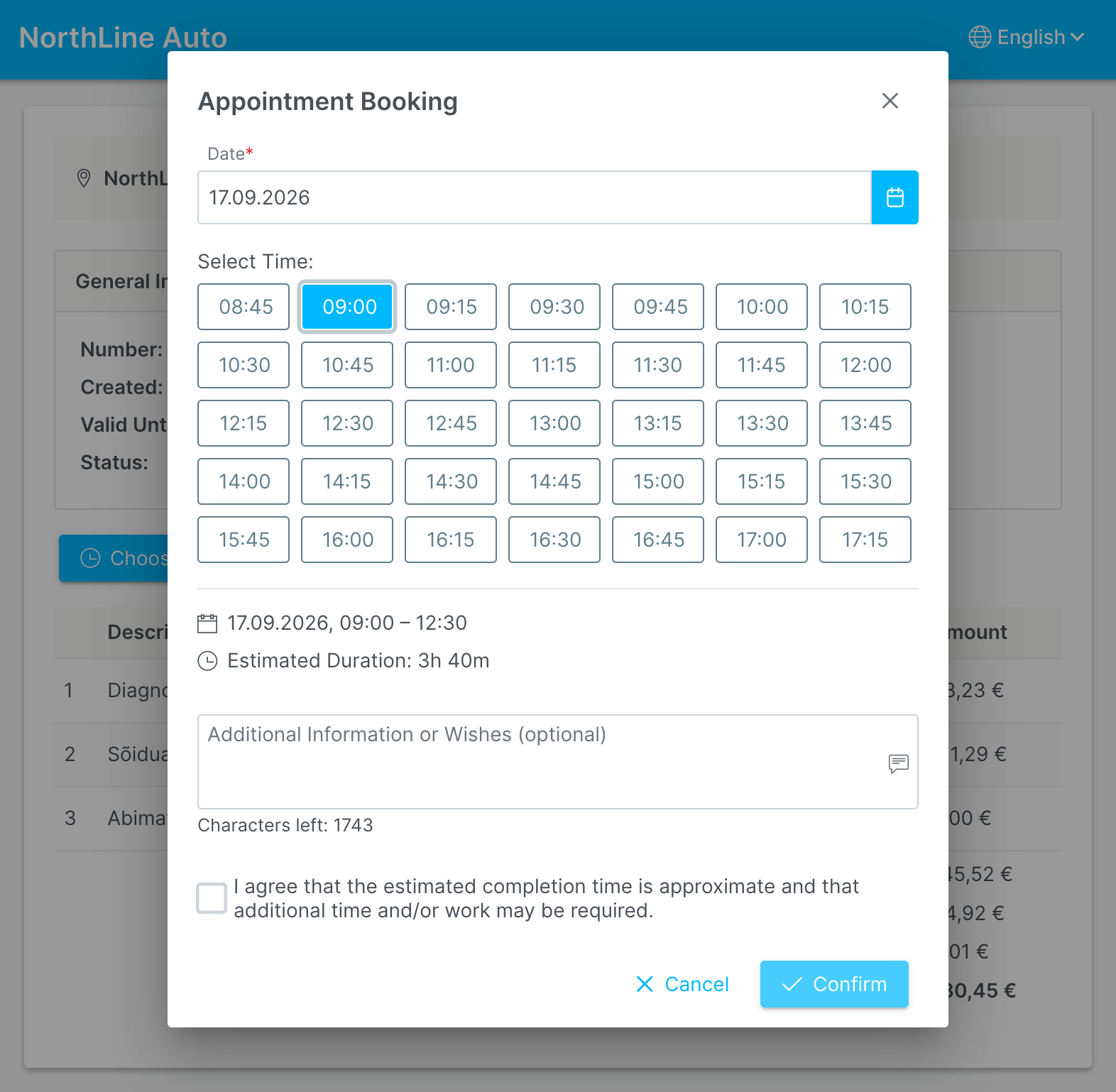
The customer opens the estimate link, enters the PIN and books a convenient time. Your workshop receives a linked work order to confirm.
If the customer or vehicle is already in your database, the enquiry is linked to the right record. See immediately whether the customer has visited before or only requested prices.
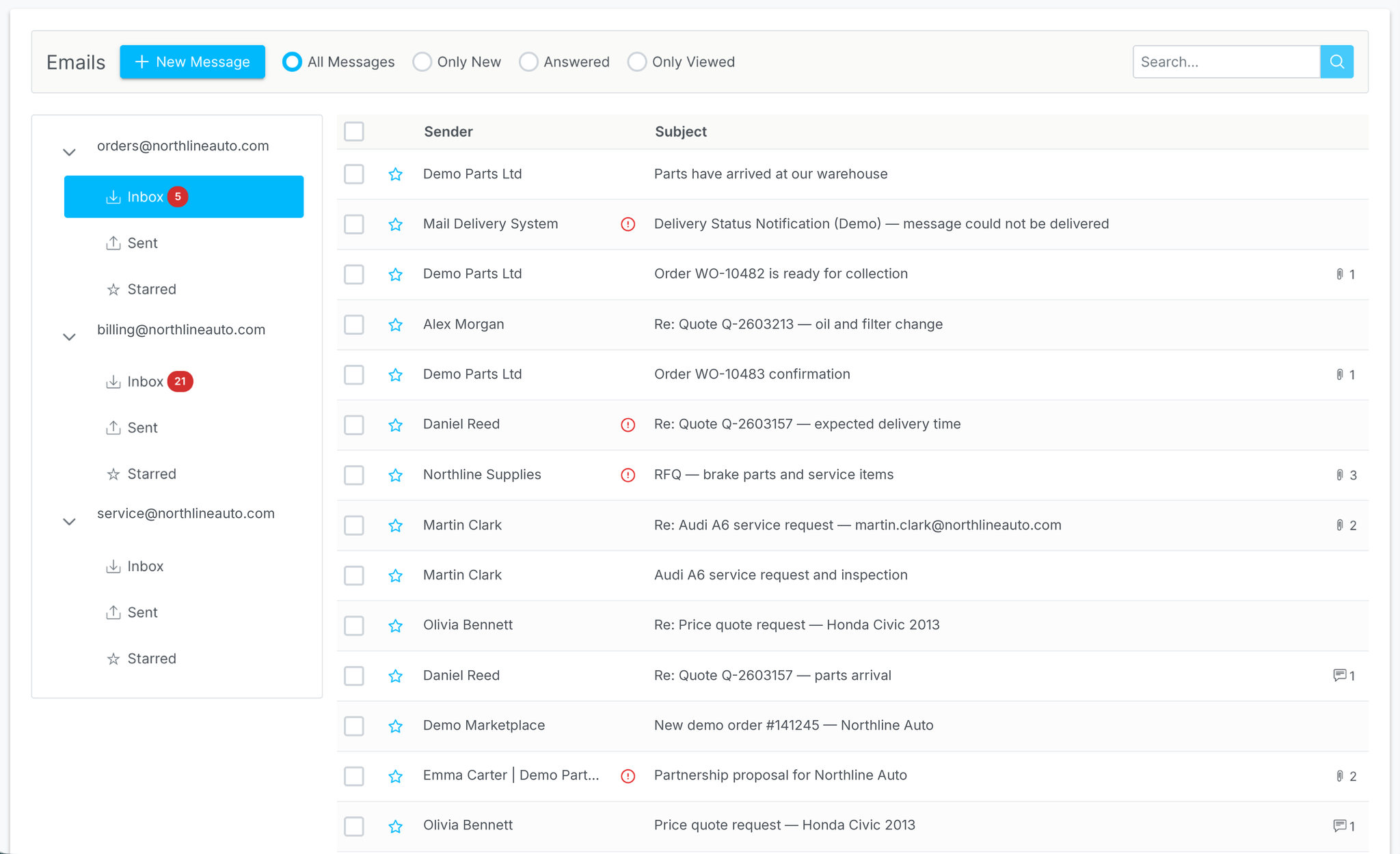
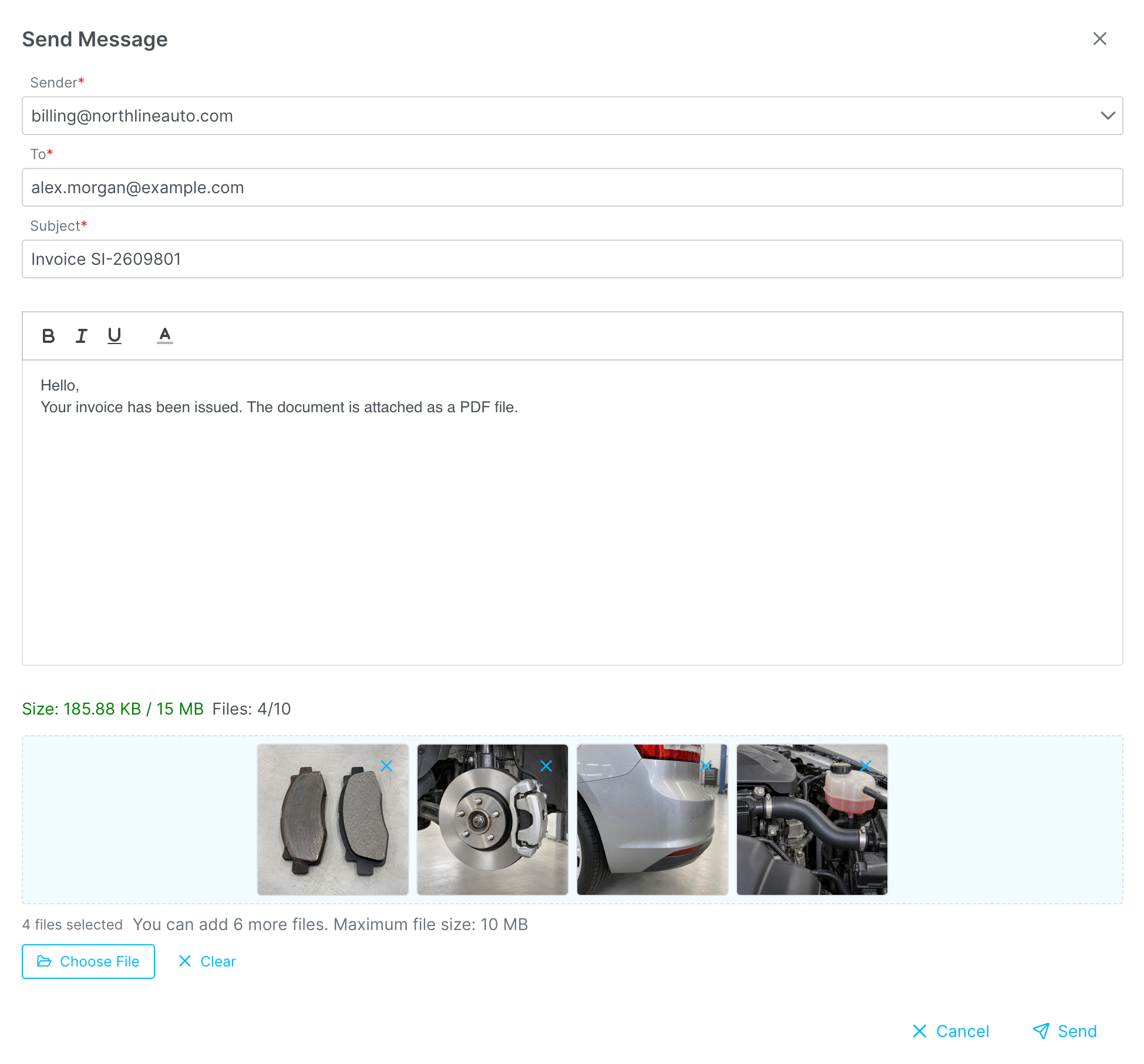
Handle customer correspondence directly in the system. Reply to emails and send invoices, estimates and files without a separate email application. The counter in the top bar helps you keep track of new messages.
Employees can reply, forward emails and filter messages by status: new, viewed or already handled.
The system keeps incoming and sent emails, including customer replies, invoices, estimates, documents, photos and other attachments.
Employees see only the email accounts they have access to. Set up signatures for outgoing messages, and prevent emails from being deleted from the history without the required permissions.
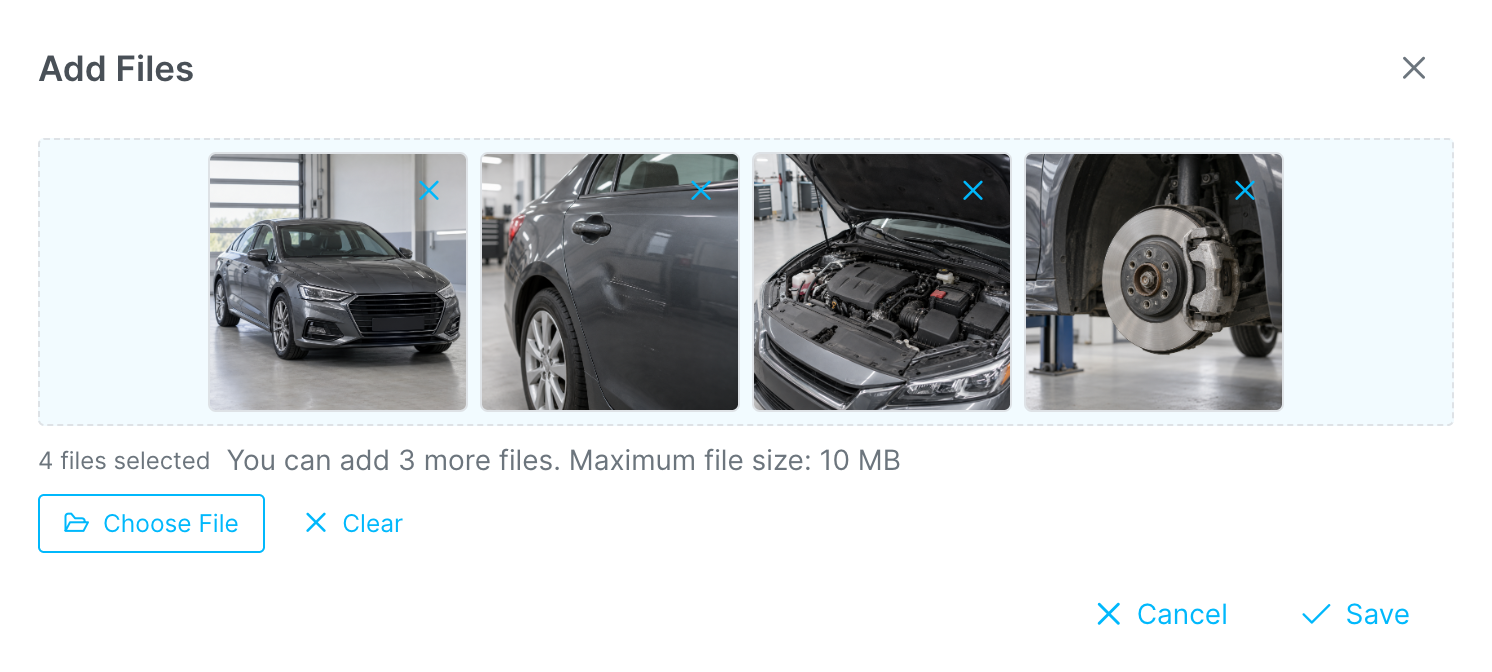
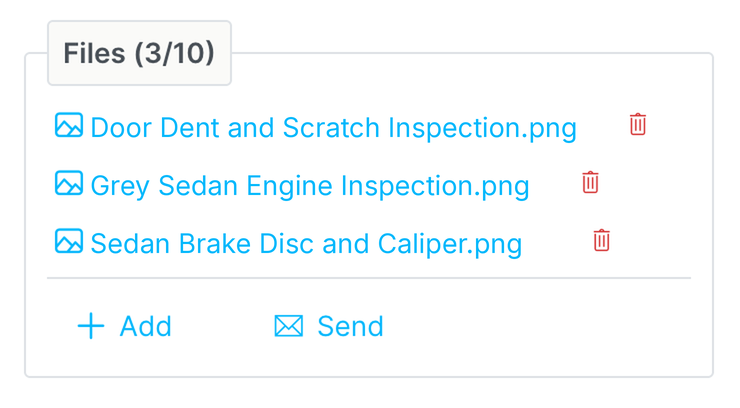
Keep photos of the vehicle and any damage, diagnostic results, documents and other files in the work order. Email the relevant material to your customer in a couple of clicks.
Keep a clear record of the work, show customers the condition of their vehicle and keep information organised within the workshop.
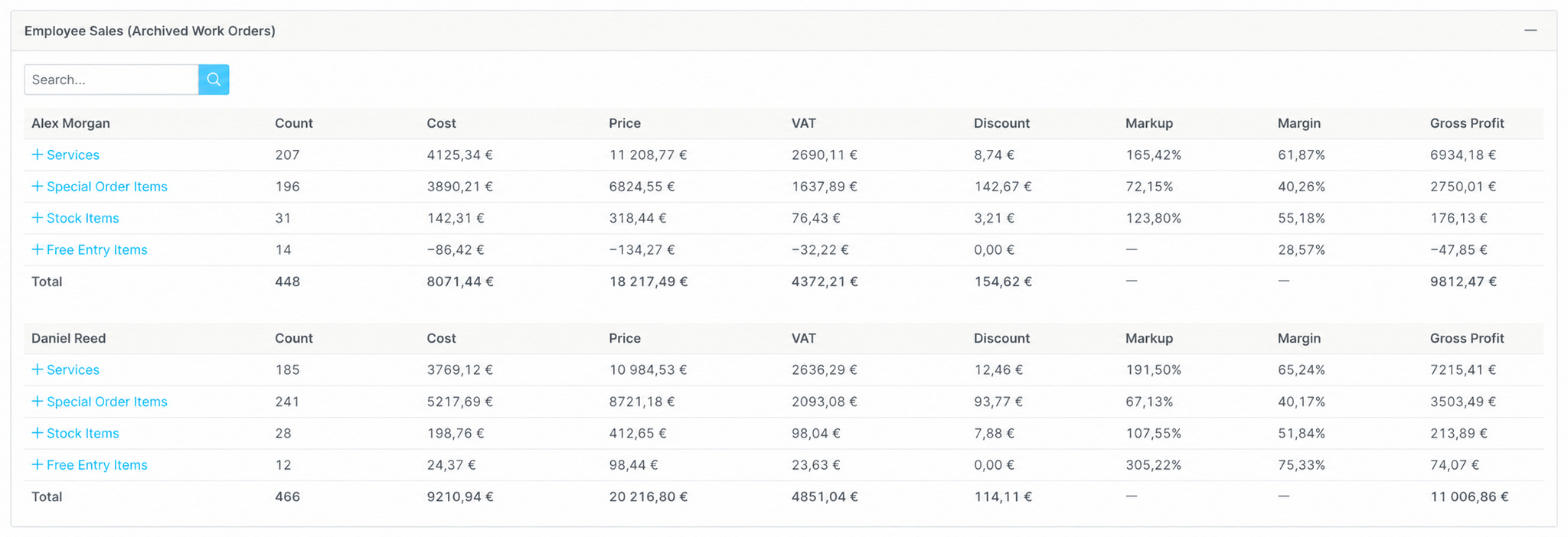
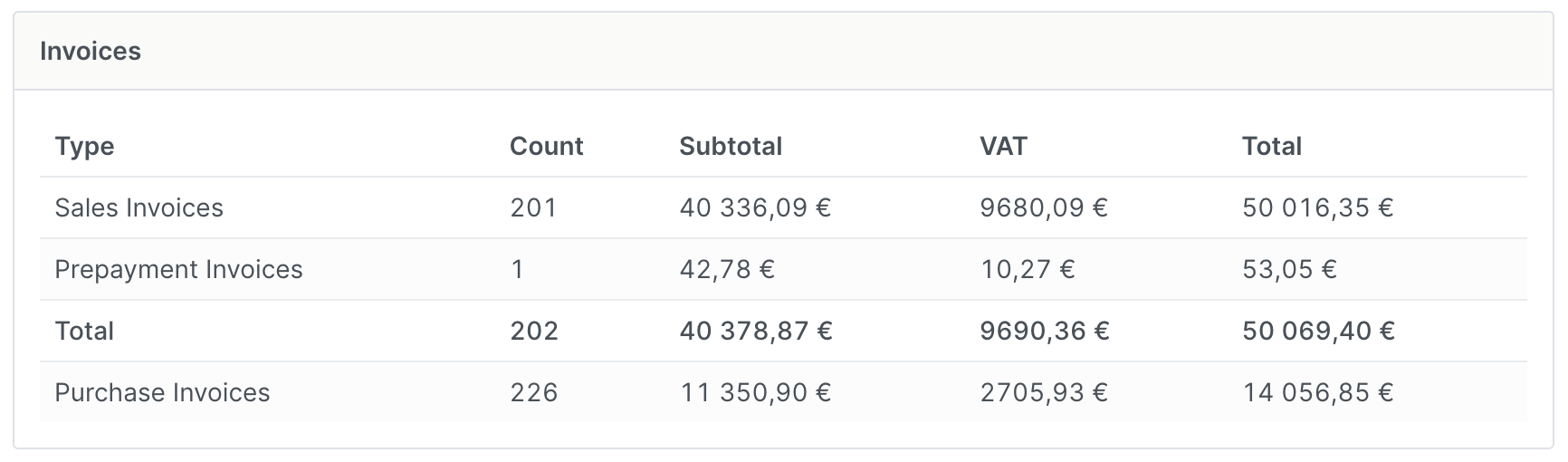
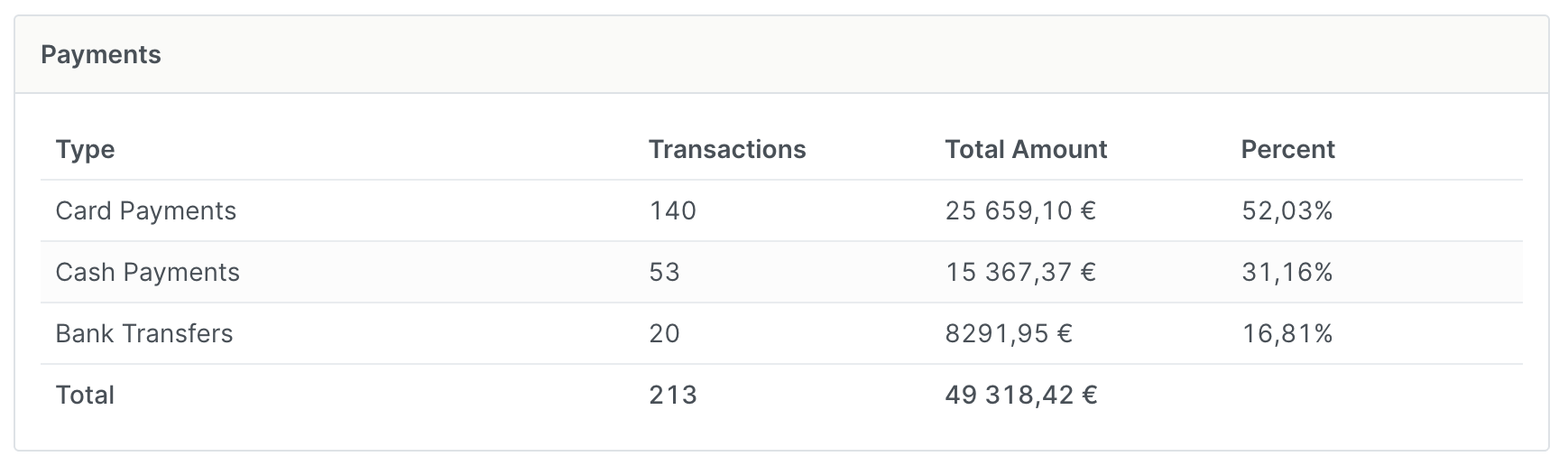
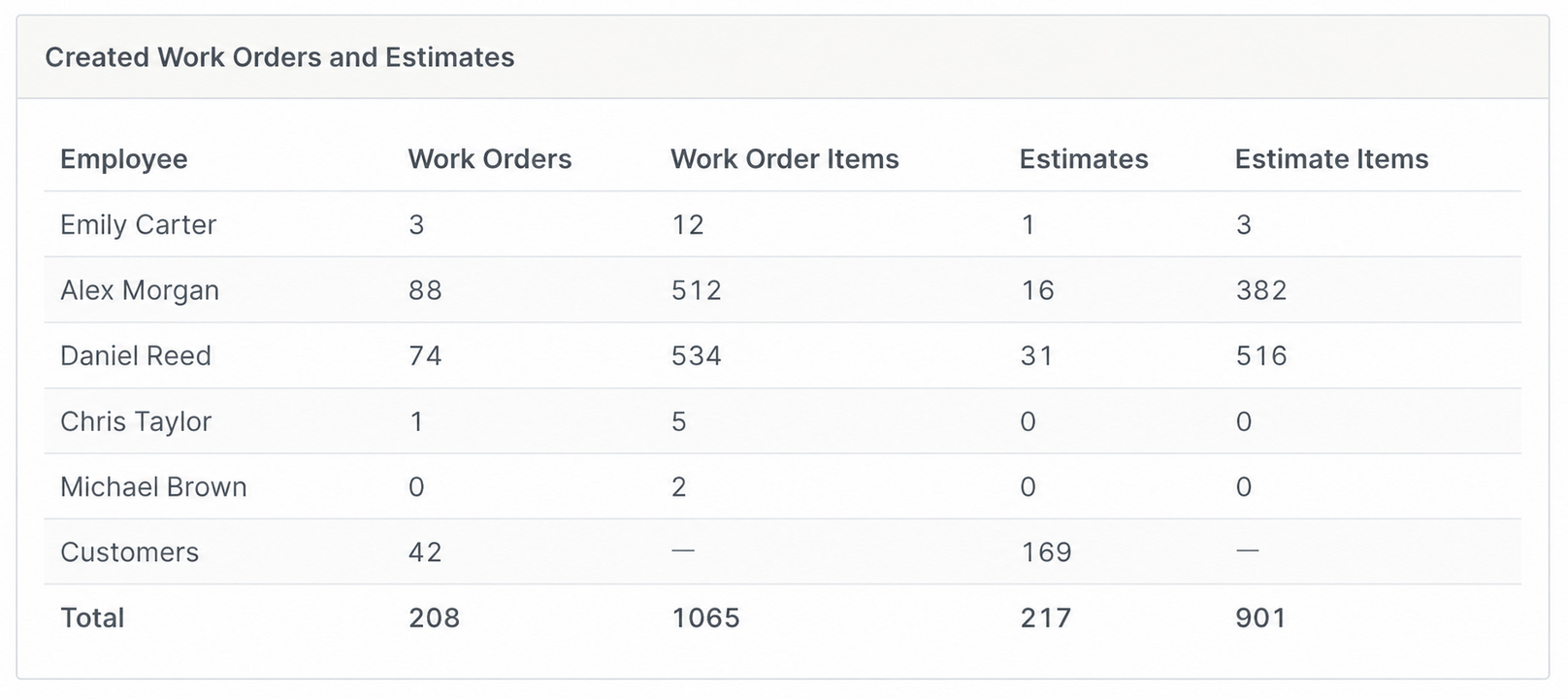
See more than turnover. Workshop managers can see what drives the result: invoices, payments, employee sales, profit, discounts, warranty work, returns, technician work and workload, earnings and consumables.
Counts and amounts for sales invoices, prepayments and supplier invoices, plus the breakdown of payments by cash, card and bank transfer.
Sales by employee: line item count, purchase costs, sales, discounts, average markup, average margin, gross profit, and work orders and estimates created.
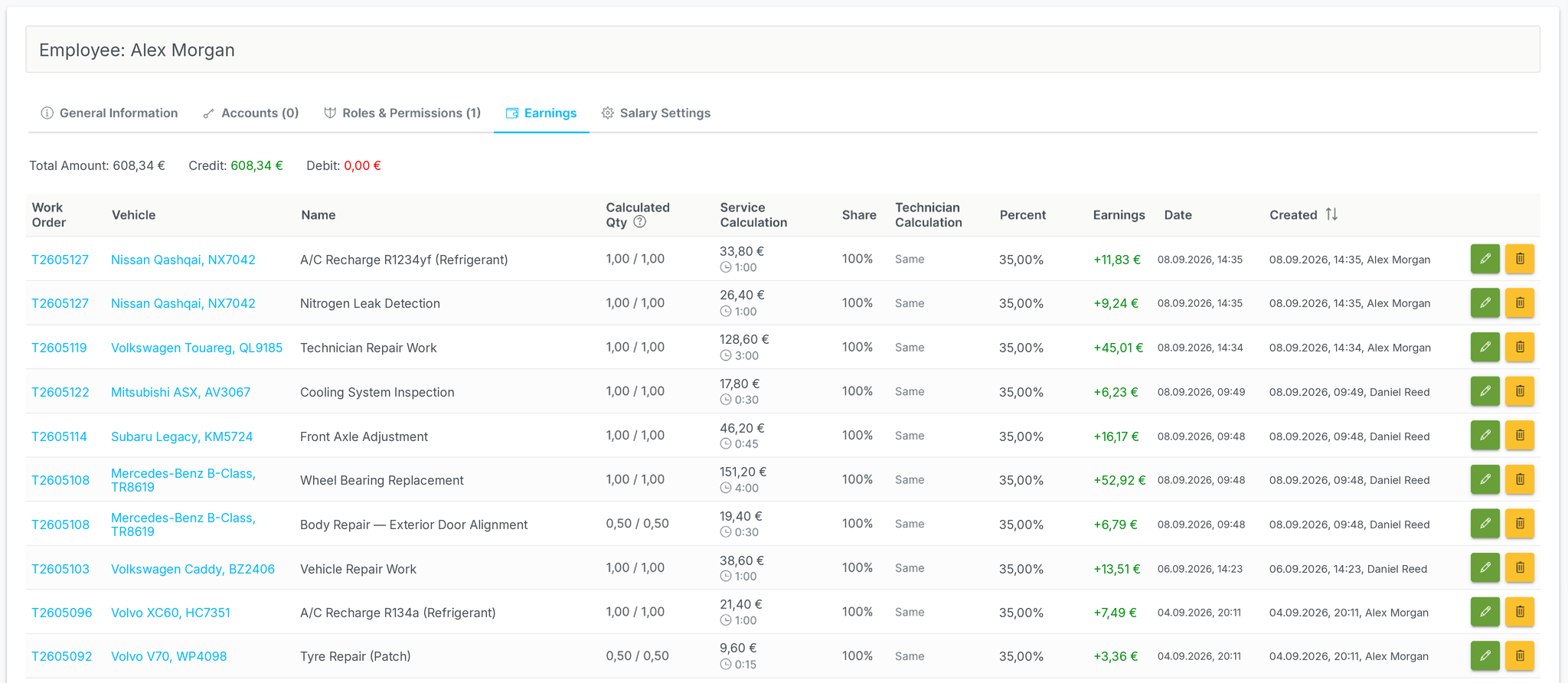
See each technician's work time on completed orders and their current workload on active orders. Also view the hours used for earnings calculations, calculated earnings and average hourly earnings.
Purchased consumables, sold consumables and consumables profit on completed work orders.
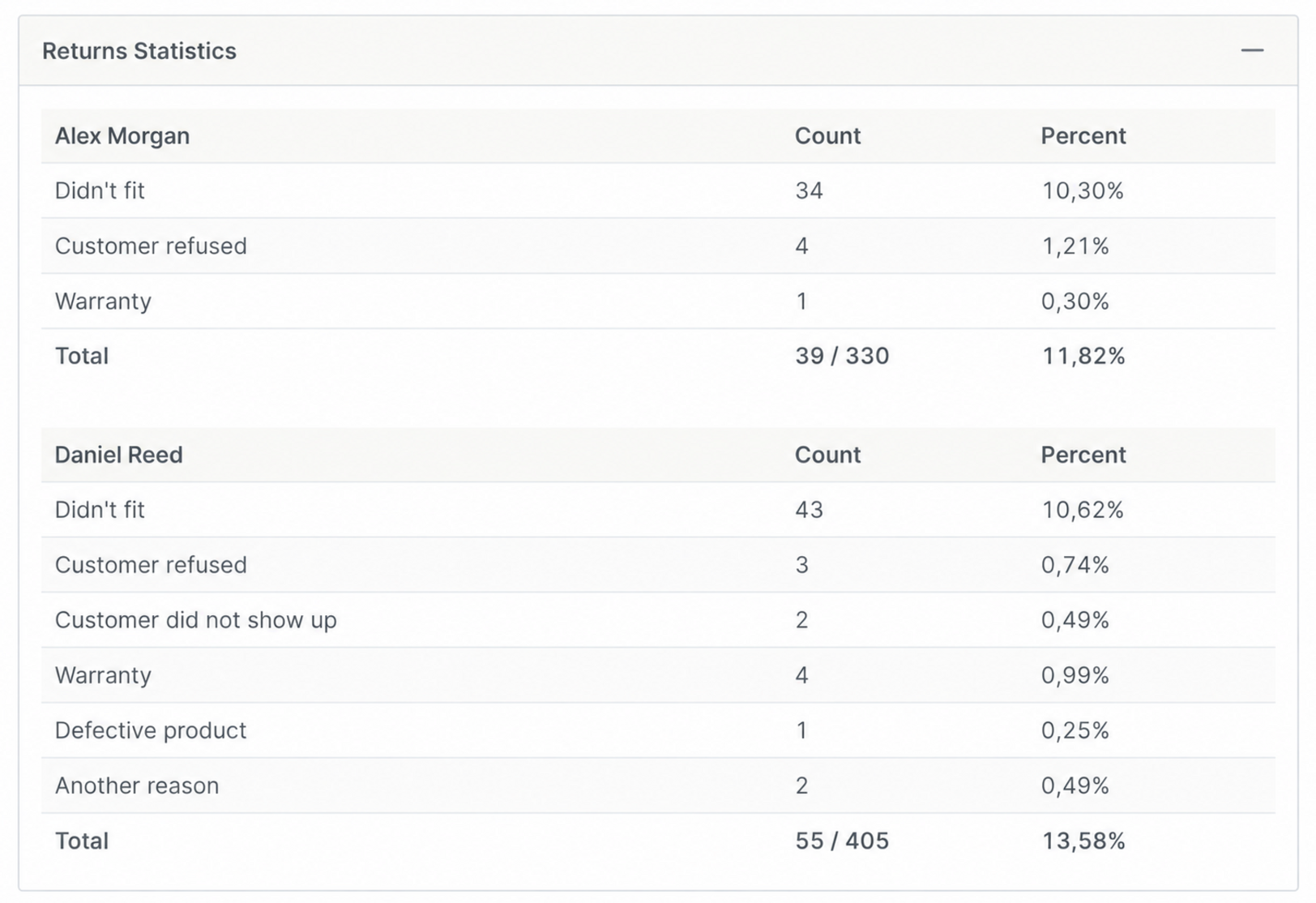
Returns by employee and reason: items added, items returned, return rate and details down to individual lines.
Warranty items are kept separate from regular sales so they don't distort sales, profit or employee performance figures.
VirtualGarage calculates technician earnings from completed work, each technician's share and the internal time used for calculation. Earnings are linked to specific work orders and services. Where needed, the quantity or time used for the calculation can be set separately from what the customer sees on the invoice or estimate.
Set a default percentage for each technician, with a different percentage or a fixed amount for individual services.
Split a single service between several technicians and calculate each person's earnings according to their share of the work.
Technicians see their assigned work orders, add comments, photos and files, and view their completed work and earnings.
Start with the right plan and grow without switching systems.
| LITE€40/mo. | BASIC€70/mo. | STANDARD ★€100/mo. | PRO€140/mo. | |
|---|---|---|---|---|
| Included employees | 1 | 2 | 3 | 4 |
| Each additional employee | €5/mo. | |||
| Work orders per month | up to 60 | up to 120 | unlimited | unlimited |
| Customers and vehicles with full history | ✓ | ✓ | ✓ | ✓ |
| Work orders and estimates | ✓ | ✓ | ✓ | ✓ |
| Sales invoices, prepayments and payments | ✓ | ✓ | ✓ | ✓ |
| Special-order parts with delivery statuses | ✓ | ✓ | ✓ | ✓ |
| Outgoing email | ✓ | ✓ | ✓ | ✓ |
| Send files and attachments to customers | — | ✓ | ✓ | ✓ |
| Scheduler / work order calendar | — | ✓ | ✓ | ✓ |
| Stock: levels, reservations and deductions from work orders | — | ✓ | ✓ | ✓ |
| Work and parts templates | — | ✓ | ✓ | ✓ |
| Consumables in work orders and estimates | — | ✓ | ✓ | ✓ |
| Price request form for your website | — | ✓ | ✓ | ✓ |
| SMS visit reminder for the customer | — | ✓ | ✓ | ✓ |
| Incoming email inside VirtualGarage | — | — | 1 account | 2 accounts |
| Supplier invoices and parts received into stock | — | — | ✓ | ✓ |
| Part returns to suppliers and to stock | — | — | ✓ | ✓ |
| SMS reminder for the customer's next service | — | — | ✓ | ✓ |
| Detailed change history | — | — | ✓ | ✓ |
| Supplier portal access control | — | — | ✓ | ✓ |
| Customer online booking from an estimate | — | — | — | ✓ |
| Technician earnings calculation | — | — | — | ✓ |
| Advanced markup rules | — | — | — | ✓ |
| Closed accounting period protection | — | — | — | ✓ |
| Basic | Basic | Advanced | Full | |
| Invoices | ✓ | ✓ | ✓ | ✓ |
| Payments | ✓ | ✓ | ✓ | ✓ |
| Created work orders and estimates | ✓ | ✓ | ✓ | ✓ |
| Technician workload | ✓ | ✓ | ✓ | ✓ |
| Sales by employee | — | — | ✓ | ✓ |
| Consumables statistics | — | — | ✓ | ✓ |
| Technician earnings statistics | — | — | — | ✓ |
| Warranty and complaint statistics | — | — | — | ✓ |
| Returns statistics | — | — | — | ✓ |
Try VirtualGarage and see how customer enquiries, work orders, payments and statistics come together in a clear, connected workflow.
14-day free trial